Receiving & Inspection with Quantity Verification and Discrepancy Detection
Record goods receipt against purchase orders at the line-item level. Detect shortages, overages, and quality issues the moment cargo is checked in. Close the loop on every inbound shipment.
Goods Receipt Linked to Purchase Orders
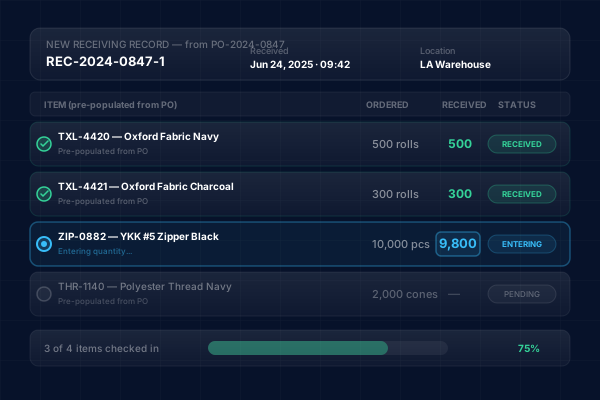
When cargo arrives at your facility, create a receiving record directly from the associated purchase order. InboundShipments pre-populates line items from the PO so your receiving team knows exactly what to expect and can record actual quantities against ordered quantities.
- Create receiving records from existing POs with one click
- Line items pre-populated with SKU, description, and ordered quantity
- Record received quantity for each line item as goods are checked in
- Receiving record links back to the PO and shipment for full traceability
Quantity Tracking and Discrepancy Detection
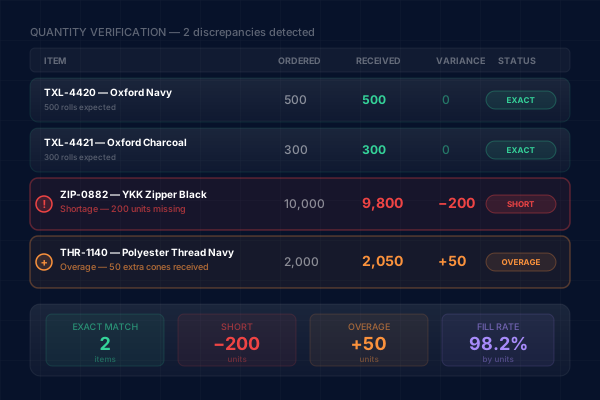
InboundShipments compares received quantities against ordered quantities at the line-item level. When a discrepancy is detected -- whether a shortage, overage, or wrong item -- it is flagged immediately so you can take action before the issue compounds.
- Side-by-side comparison of ordered vs. received quantities
- Automatic detection of shortages and overages per line item
- Receiving statuses: Received, Partial, and Short
- Discrepancy data feeds into vendor performance visibility over time
Receiving Notes and Inspection Records
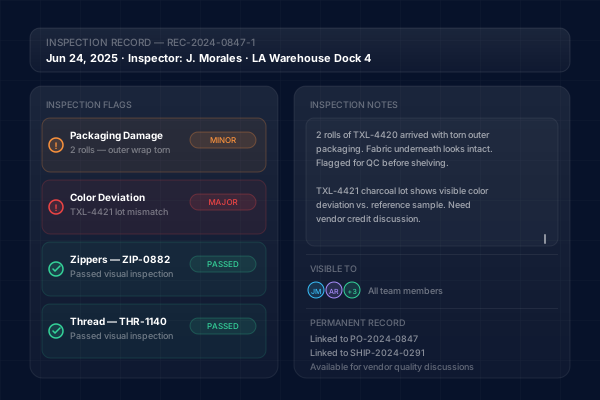
Not every discrepancy is a quantity issue. InboundShipments provides notes fields on receiving records so your team can document damage, quality issues, wrong items, or any other observations made during inspection. These notes become part of the permanent record.
- Free-text notes on each receiving record for inspection observations
- Document damage, quality defects, or packaging issues
- Notes visible to anyone reviewing the shipment or PO history
- Build a documented history for vendor quality discussions
Receiving Status Drives PO Completion
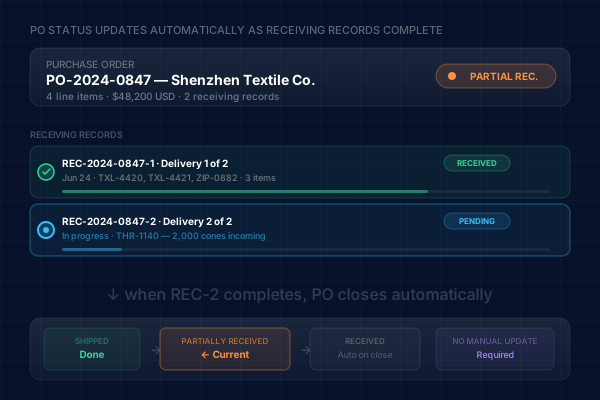
As receiving records are created and completed, the parent purchase order status updates to reflect progress. A PO with some items received shows as Partially Received, and once all line items are fully received, the PO moves to Received status automatically.
- PO status reflects the aggregate state of all receiving records
- Partial receipts tracked separately so nothing falls through the cracks
- Complete receiving closes out the PO lifecycle
- Clear visibility into which POs still have outstanding deliveries
Precision Receiving for Inbound Supply Chains
Why Teams Choose InboundShipments for Receiving
Replace clipboard checklists and manual reconciliation with connected, digital receiving.
Catch shortages and overages immediately
When your receiving team records actual quantities, InboundShipments instantly compares them to the PO. Shortages and overages are visible the moment goods are checked in, not weeks later when someone reconciles a spreadsheet.
Close the loop on every shipment
Receiving is the final step in the inbound supply chain. By recording receipt in InboundShipments, you close the loop from PO creation through shipment tracking to actual delivery, giving you a complete record of the entire process.
Document inspection findings for vendor accountability
Receiving notes provide a written record of quality issues, damage, or specification deviations. Reference these notes in vendor discussions to support claims, negotiate credits, or improve future order accuracy.
Automate PO status updates
No need to manually update PO status when goods arrive. As receiving records are completed, InboundShipments automatically transitions the PO to Partially Received or Received, keeping your PO list accurate without extra effort.
Reduce receiving errors with pre-populated data
Because receiving records pull line items directly from the PO, your warehouse team does not need to re-enter SKU details. They simply record quantities received, reducing data entry errors and speeding up the check-in process.
Receiving & Inspection FAQ
Never miss a discrepancy again
Track every receipt against your POs with line-item quantity verification and inspection notes. Start your free trial today.
Explore Related Solutions
Purchase Order Visibility
Manage the POs that feed into your receiving process with full lifecycle tracking and line-item detail.
Learn moreInbound Shipment Tracking
Track the containers and vessels carrying your goods so you know when to expect deliveries at your facility.
Learn moreVendor & Supplier Management
Maintain your supplier directory and use receiving data to assess vendor reliability and order accuracy.
Learn more