Vendor & Supplier Management for Your Entire Supply Chain Network
Centralize every supplier, freight forwarder, customs broker, warehouse, and transporter in one role-based directory. Contacts flow into POs, shipments, and invoices so you enter information once and use it everywhere.
Role-Based Contact Organization
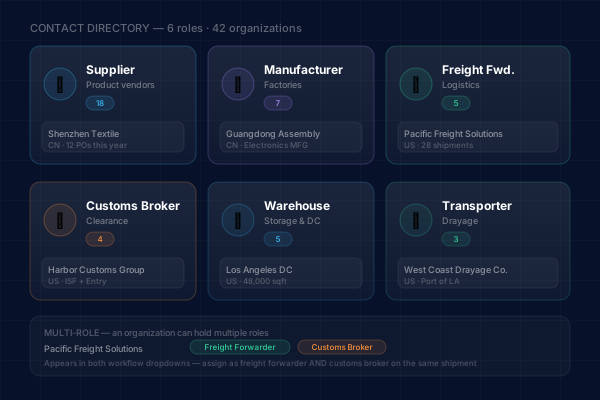
Every supply chain involves multiple types of partners. InboundShipments organizes your directory with specific roles -- supplier, manufacturer, freight forwarder, customs broker, warehouse, and transporter -- so you can quickly find the right contact for any situation.
- Six predefined roles: supplier, manufacturer, freight forwarder, customs broker, warehouse, transporter
- Assign one or more roles to each contact organization
- Filter and search your directory by role to find the right partner fast
- Roles determine how contacts appear in PO, shipment, and invoice workflows
Complete Address and Contact Management
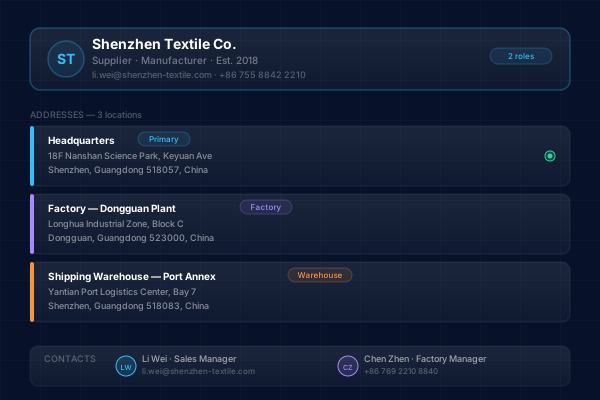
Each organization in your directory can have multiple addresses and contact people. Store headquarters, factory locations, warehouse addresses, and regional offices all under a single organization record. Add individual contacts with names, emails, and phone numbers.
- Multiple addresses per organization for different locations and functions
- International address support with country, state, city, and postal code fields
- Individual contact records with name, email, phone, and role designation
- Addresses selectable when creating POs, shipments, and other records
Import and Export Your Contact Data
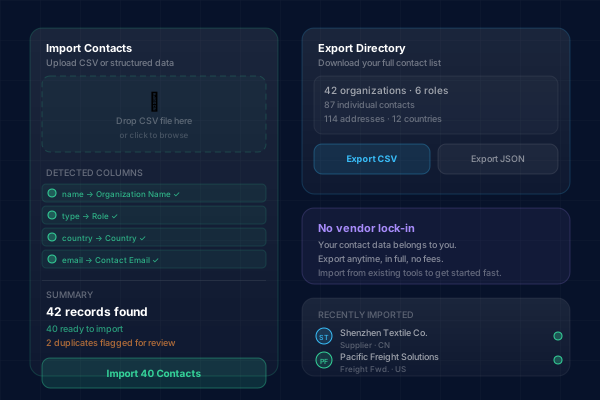
InboundShipments provides import and export functionality for your contact directory. Export your contacts to share with other systems or team members. Import contacts from existing data sources to get up and running quickly without manual data entry.
- Export your full contact directory for backup or sharing
- Import contacts from structured data to bulk-populate your directory
- Maintain data consistency across your supply chain tools
- No vendor lock-in: your contact data is always accessible
Contacts Power Every Workflow
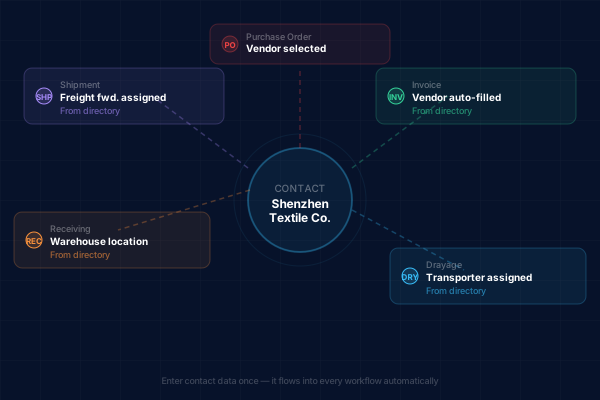
Your contact directory is not just an address book. It drives the rest of InboundShipments. When you create a purchase order, you select the vendor from your directory. When you create a shipment, you assign the freight forwarder and customs broker. Contact data flows through every workflow.
- Select PO vendors directly from your supplier and manufacturer contacts
- Assign freight forwarders and customs brokers to shipments
- Warehouse contacts appear in receiving and delivery workflows
- Transporter contacts available for drayage and last-mile delivery records
Your Supply Chain Directory, Connected to Everything
Why Teams Choose InboundShipments for Contact Management
Replace scattered spreadsheets and business cards with a centralized, role-based partner directory.
Stop searching through email for vendor details
Centralize every supplier address, freight forwarder contact, and customs broker detail in one directory. When you need to reach a partner or reference their information, it is always one search away.
Ensure consistency across your team
When everyone on your team uses the same contact directory, you eliminate the problem of outdated vendor information, misspelled addresses, or missing contact details that cause operational errors.
Speed up PO and shipment creation
Instead of typing vendor details from scratch every time, select from your directory. Addresses, contact information, and organizational details auto-populate into POs, shipments, and invoices.
Organize partners by their role in your supply chain
The role-based system means you can quickly filter to see just your freight forwarders when booking a shipment, or just your suppliers when creating a purchase order. No more scrolling through an undifferentiated contact list.
Maintain a complete partner history
Because contacts are linked to POs, shipments, and invoices, you can see the full history of your relationship with any partner: every order placed, every shipment handled, every invoice processed.
Vendor & Supplier Management FAQ
Centralize your supply chain contacts
Organize every partner by role and connect them to your POs, shipments, and invoices. Start your free trial today.
Explore Related Solutions
Purchase Order Visibility
Create POs by selecting vendors from your directory, with auto-populated addresses and contact details.
Learn moreInbound Shipment Tracking
Assign freight forwarders and customs brokers from your directory to every inbound shipment.
Learn moreInternational Inbound Logistics
Manage global supplier relationships with international address support and multi-currency capabilities.
Learn more